Sarah Blackstock posted: "We're happy to announce the addition of a frequently requested feature in the WordPress mobile apps: plugin management! With the 9.1 update for the iOS and Android apps, WordPress.com Business plan sites with plugins and self-hosted WordPress sites with J"
We're happy to announce the addition of a frequently requested feature in the WordPress mobile apps: plugin management! With the 9.1 update for the iOS and Android apps, WordPress.com Business plan sites with plugins and self-hosted WordPress sites with Jetpack can now manage their plugins right in the app.
Instead of going to your dashboard in a web browser for every little plugin change, you can now browse your site's plugins in the WordPress mobile apps, and activate, deactivate, and update plugins right from your phone. You can also manage auto-updates, remove most plugins, and find a link to the plugin's page on WordPress.org for quick reference.
Try It Out
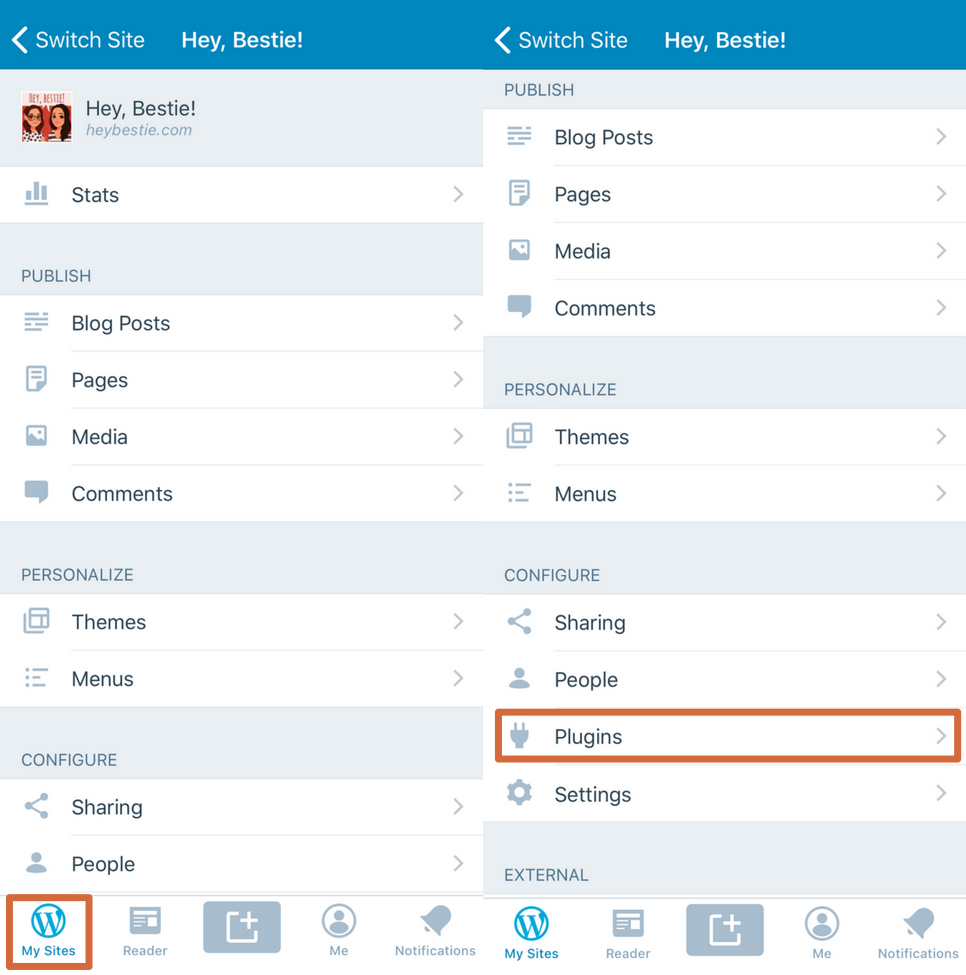
To find plugins in your app, make sure you've updated to version 9.1+ and have the Jetpack plugin (version 5.6+ required). Once you're updated, you'll see a new "Plugins" area under "Configure".
Send Feedback
If you have any questions or feedback on managing plugins in the apps, reach out to our in-app support team by tapping Me → Help & Support → Contact Us.
Jan Cavan Boulas posted: "Today, we're introducing Conversations: a tool in the Reader that makes it easier for you to monitor and participate in the discussions you care about the most. Let's face it: it can be hard to keep track of all the conversations you take part in online."
Today, we're introducing Conversations: a tool in the Reader that makes it easier for you to monitor and participate in the discussions you care about the most.
Let's face it: it can be hard to keep track of all the conversations you take part in online. When your favorite posts generate an active discussion, you might miss out on some meaningful exchanges. To find out if a post has new comments, you would have to manually search for it in your stream, or enable comment emails, which would then fill your inbox with every single comment coming from that post.
With the new Conversations page, new comments on your followed posts on any WordPress.com or Jetpack-connected sites will all appear in a single stream, including for sites you don't follow. You'll now be able to read and add your replies without having to leave the Reader!
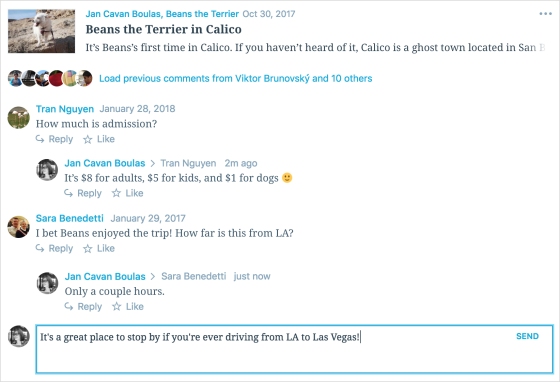
You can also view earlier comments by expanding the row of avatars under a post.
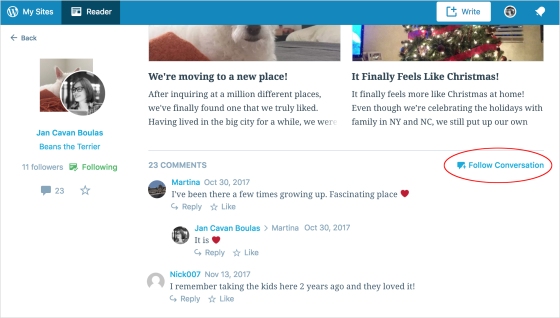
Which posts will appear in Conversations? Any post you've Liked or commented on will show up there. You may also manually add a post by choosing the Follow Conversation option when you view the full post in the Reader...
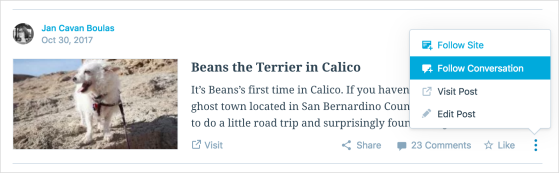
...or directly from your stream.
If you decide to leave a conversation, just unfollow it to remove it from your Conversations stream.
By making it easier for people to monitor and participate in conversations they care about, we can encourage more interaction and allow everyone to easily join the discussions happening on your site.
Give Reader Conversations a try and let us know what you think in the comments below! Thank you, once again, for being part of the WordPress.com community.
Mark Armstrong posted: "Some years go by slowly -- not because they're busier, but maybe there's just more out there in the world to stop and notice. We hope the WordPress.com and Jetpack community offered you some of those moments this year. Maybe it was a helpful chat with so"
Some years go by slowly -- not because they're busier, but maybe there's just more out there in the world to stop and notice. We hope the WordPress.com and Jetpack community offered you some of those moments this year.
Maybe it was a helpful chat with someone on our Happiness team, or maybe you discovered a cool new feature that made business or blogging even easier. Perhaps you read something on WordPress.com that inspired you. We just want to say thanks for being here, and we're excited to see what you all accomplish in 2018 and beyond.
Below are some highlights from the year in WordPress.com -- and make sure you check out WordPress.com Discover to see more favorite moments from 2017. Happy New Year! Read more of this post
Sarah Blackstock posted: "Have you given the WordPress mobile apps a try lately? We've been working hard to make sure our iOS and Android apps are simple to use and have the features you need to blog right from your phone or tablet. Here are a few recent additions and updates that"
Have you given the WordPress mobile apps a try lately? We've been working hard to make sure our iOS and Android apps are simple to use and have the features you need to blog right from your phone or tablet. Here are a few recent additions and updates that make blogging on the go easier:
Add Categories and Tags
Before publishing a blog post, you can add categories and tags right in the app's post editor. To add categories and tags to a post in the iOS editor, tap the … at the top right, then Options. On Android, tap the gear icon at the top right. Read more of this post
Caroline Moore posted: "Today we're excited to announce two new premium themes: Small Business and Photo Blog. Small Business Small Business is a new premium theme for your entrepreneurial endeavors. At an introductory price of just $5 (or free with the Premium or Business pla"
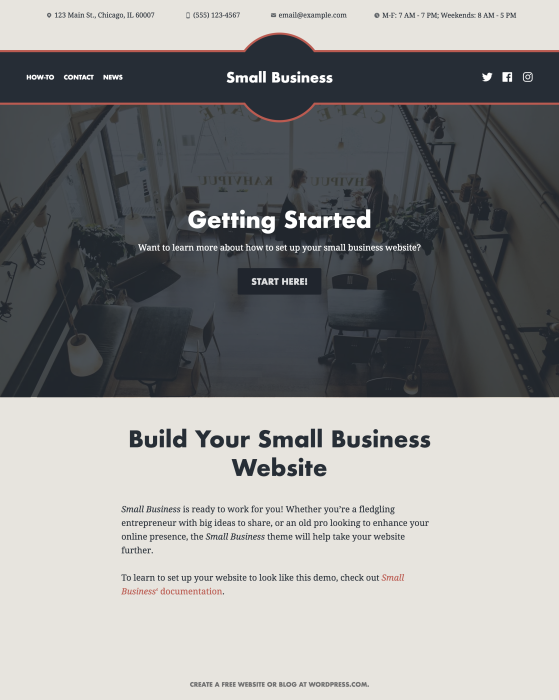
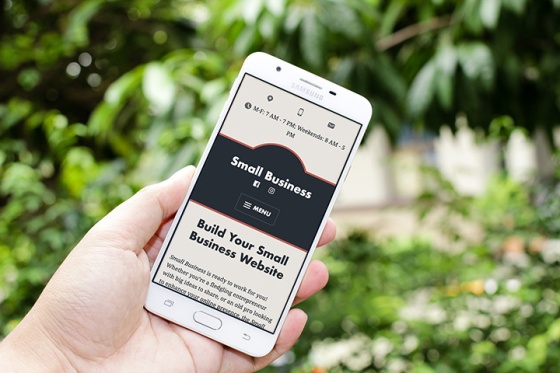
Small Business is a new premium theme for your entrepreneurial endeavors. At an introductory price of just $5 (or free with the Premium or Business plans), it's a worthwhile investment for your business.
Small Business was designed with a simple, single-column layout for a consistent reading experience no matter the device or screen size, and uses system fonts to reduce page-load time. We've also included a few tailored features just for small businesses, like:
Contact Information: Your customers are busy people – that's why easy access to essential information like your phone number and address is so important. Small Business displays a banner with your contact information on every page and turns all the information into links, so your customers can call, email, or find you on a map with a click.
Promo Area: Do you have a new product coming out? A seasonal sale? A special event? Whatever it is, you'll want to put this information right on the front page to make sure your customers see and act on it. Small Business includes a Promo Area area that makes it as easy as flipping a switch!
Style Packs: If Small Business' bold design doesn't feel right for you, choose one of the three included Style Packs -- Modern Flair, Country Charm, or Classic Elegance -- for a different look and feel with the click of a button.
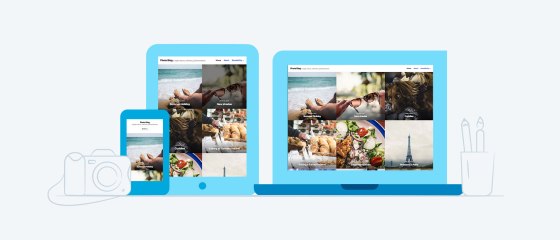
Photo Blog is our new premium theme for visual storytellers. It's available for $36, or comes free with the Premium or Business plans.
Photo Blog comes with many features that help your photographs shine:
Layout: Along with its default square layout, Photo Blog comes with two additional layout options. The Grid layout adds space between your images, while Masonry creates an interlocking grid, which respects your image orientation and pieces them cleanly together.
Default
Grid
Masonry
Featured Images Filter:Photo Blog comes with a variety of image filters you can apply to your Featured Images. Choose from faded Reyes, black-and-white Willow, saturated Lo-fi, or one of the other 23 options.
Default
Reyes
Willow
Lo-fi
Style Packs: If you're searching for a different look for Photo Blog, check out its Style Packs -- Elegant, Retro Photo, or Vintage Paper -- to change up your site's appearance.


 WordPress.com