Matt Bumgardner posted: "Are you using the WordPress for iOS app on your mobile device? Our mobile team is excited to announce a big update to the share extension in the app. The ability to share content from other apps is a core part of the iOS experience. Last fall, we decided"
Are you using the WordPress for iOS app on your mobile device? Our mobile team is excited to announce a big update to the share extension in the app.
The ability to share content from other apps is a core part of the iOS experience. Last fall, we decided that our share extension was overdue for a refresh, so we rolled up our sleeves and rethought the entire workflow for both iPhones and iPads. The result is a new and improved experience in version 9.6!
Sharing made easier
Now when you share content, you'll notice that the share extension allows you to format text, add headings, make lists, and more with a toolbar similar to the one in your app's existing editor. After drafting your post, you can assign a category and add relevant tags. When you're satisfied, select the site to publish the post on and tap Publish at the top right. The app will then upload your post and images in the background and notify you when it's finished.
As a bonus, if you share something from Safari, the extension will provide an attribution link and automatically format any selected text in a blockquote.
A brand-new draft extension
Our customers provide us with great feedback, and many of you have let us know that you often would like to capture an idea for later. Perhaps you want to upload a snapshot from the Photos app, or save a motivational quote from a fellow writer's website for your next post.
The new draft extension allows you to do just that: now, you can quickly save selected content in a draft post, allowing you to work on it later.
Step 1
Step 2
Step 3
Set up your device and start sharing
Activating both of these extensions requires a few small steps, but you should only have to do this once. To get started, open the app that contains the content you'd like to share and tap the share button. The standard iOS share screen will appear.
The top row contains iOS share extensions -- this is where your WordPress share extension lives. The row underneath contains what Apple calls "action" extensions. You'll find the draft extension here.
On the share screen, do the following for each extension:
Swipe the row all the way to the right.
Find and tap on the "More…" icon -- the Activities menu will appear.
Scroll down the list and locate "WordPress" (share extension) or "Save as Draft" (draft extension) and turn on the switch.
Tap "Done."
Share button
“More” icons
Enable the share extension
Enable the draft extension
The next time you open the share screen, you'll see both extensions.
Thank you
The mobile team hopes you enjoy these new extensions and that they offer new possibilities for adding content to your site. As always, we welcome your feedback.
scoutharris posted: "The latest stage in our authentication redesign effort improves signup and site creation on our mobile applications. (WordPress.com offers apps for your Android or iOS device.) Signup To simplify signup, we've separated site creation from account creati"
The latest stage in our authentication redesign effort improves signup and site creation on our mobile applications. (WordPress.com offers apps for your Android or iOS device.)
Signup
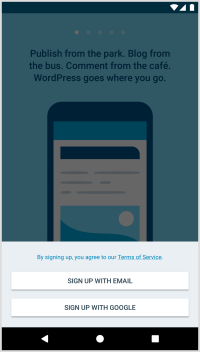
To simplify signup, we've separated site creation from account creation. Signup now has its own flow guiding you through the process, allowing you to modify information as you go.
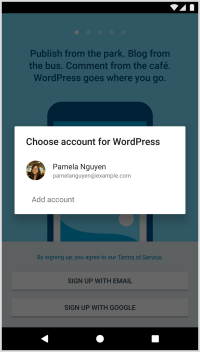
It begins with a choice: you can signup via email, or signup via your Google account.
If you select Google, the Google signup process is presented.
If you select email, we'll send you a signup email after you enter your email address. Clicking the link it contains completes the signup process.
In either case, we'll present a final screen where you can modify your display name and username. We'll share a list of username options to choose from based on your current username. If you've signed up with an email address, you'll also get the opportunity to set an account password.
And, finally, once signup is complete, you'll be able to create your first site!
WordPress.com Site Creation
The new site-creation flow walks you through the steps involved, providing more options and flexibility.
First, we'll ask you to choose the type of site you want -- either a blog, website, or portfolio. This choice dictates the mobile-friendly starter themes we'll show you in the following step. Once you select a theme, we'll ask you for your site's title and tagline. Based on the site title you enter, we'll offer a list of available domain name suggestions you can choose from. Once you select a domain, we'll create the site and show you a preview of it. At that time, you can either configure site settings or jump right into writing your first post.
Get the WordPress.com App for your device
WordPress.com offers apps for your Android or iOS device.
Feedback?
What do you think of the new signup and site creation changes? We'd love to hear your thoughts and look forward to your feedback!
Sarah Blackstock posted: "We're happy to announce the addition of a frequently requested feature in the WordPress mobile apps: plugin management! With the 9.1 update for the iOS and Android apps, WordPress.com Business plan sites with plugins and self-hosted WordPress sites with J"
We're happy to announce the addition of a frequently requested feature in the WordPress mobile apps: plugin management! With the 9.1 update for the iOS and Android apps, WordPress.com Business plan sites with plugins and self-hosted WordPress sites with Jetpack can now manage their plugins right in the app.
Instead of going to your dashboard in a web browser for every little plugin change, you can now browse your site's plugins in the WordPress mobile apps, and activate, deactivate, and update plugins right from your phone. You can also manage auto-updates, remove most plugins, and find a link to the plugin's page on WordPress.org for quick reference.
Try It Out
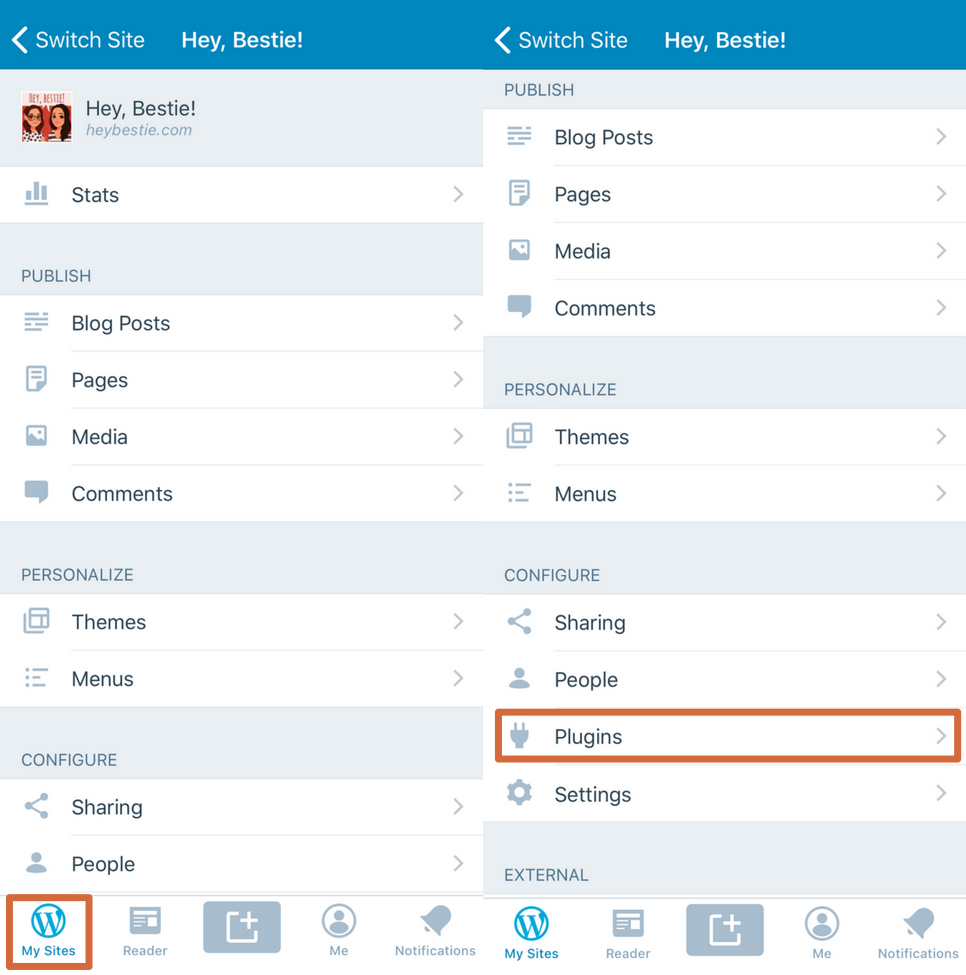
To find plugins in your app, make sure you've updated to version 9.1+ and have the Jetpack plugin (version 5.6+ required). Once you're updated, you'll see a new "Plugins" area under "Configure".
Send Feedback
If you have any questions or feedback on managing plugins in the apps, reach out to our in-app support team by tapping Me → Help & Support → Contact Us.
Jan Cavan Boulas posted: "Today, we're introducing Conversations: a tool in the Reader that makes it easier for you to monitor and participate in the discussions you care about the most. Let's face it: it can be hard to keep track of all the conversations you take part in online."
Today, we're introducing Conversations: a tool in the Reader that makes it easier for you to monitor and participate in the discussions you care about the most.
Let's face it: it can be hard to keep track of all the conversations you take part in online. When your favorite posts generate an active discussion, you might miss out on some meaningful exchanges. To find out if a post has new comments, you would have to manually search for it in your stream, or enable comment emails, which would then fill your inbox with every single comment coming from that post.
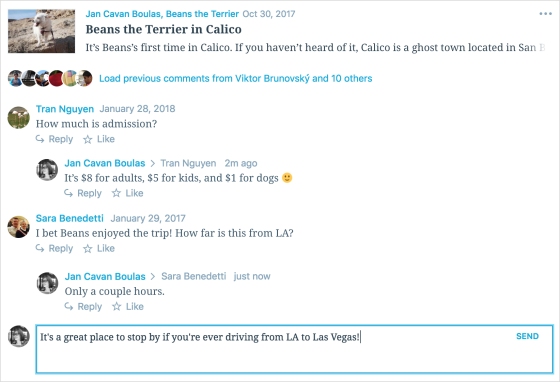
With the new Conversations page, new comments on your followed posts on any WordPress.com or Jetpack-connected sites will all appear in a single stream, including for sites you don't follow. You'll now be able to read and add your replies without having to leave the Reader!
You can also view earlier comments by expanding the row of avatars under a post.
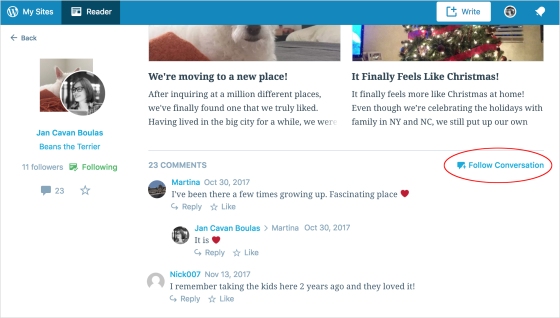
Which posts will appear in Conversations? Any post you've Liked or commented on will show up there. You may also manually add a post by choosing the Follow Conversation option when you view the full post in the Reader...
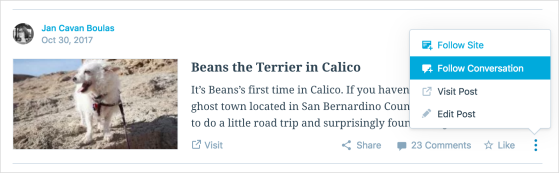
...or directly from your stream.
If you decide to leave a conversation, just unfollow it to remove it from your Conversations stream.
By making it easier for people to monitor and participate in conversations they care about, we can encourage more interaction and allow everyone to easily join the discussions happening on your site.
Give Reader Conversations a try and let us know what you think in the comments below! Thank you, once again, for being part of the WordPress.com community.
Mark Armstrong posted: "Some years go by slowly -- not because they're busier, but maybe there's just more out there in the world to stop and notice. We hope the WordPress.com and Jetpack community offered you some of those moments this year. Maybe it was a helpful chat with so"
Some years go by slowly -- not because they're busier, but maybe there's just more out there in the world to stop and notice. We hope the WordPress.com and Jetpack community offered you some of those moments this year.
Maybe it was a helpful chat with someone on our Happiness team, or maybe you discovered a cool new feature that made business or blogging even easier. Perhaps you read something on WordPress.com that inspired you. We just want to say thanks for being here, and we're excited to see what you all accomplish in 2018 and beyond.
Below are some highlights from the year in WordPress.com -- and make sure you check out WordPress.com Discover to see more favorite moments from 2017. Happy New Year! Read more of this post


 WordPress.com